
How to Contact Whatsapp Support?
There are different ways to contact WhatsApp customer support: Directly from the Banned Message
How to contact WhatsApp Support?
There are different ways to contact WhatsApp customer support:
1. Directly from the Banned Message
If your WhatsApp account is banned, tap on the "Contact Support" or "Learn More" option when you try to log in. This will open a pre-formatted email or contact form. Provide a detailed explanation of your situation and request a ban review.
2. Through WhatsApp Settings
If you can still access the app settings,
- Open WhatsApp.
- Go to “Settings” > “Help” > “Help Center” > “Contact Us.”
- Describe your situation in the provided space clearly and concisely or you can use the templates
3. WhatsApp support email for banned number
To contact WhatsApp support, email support@whatsapp.com with a clear subject line like "Appeal for banned number" to get their attention. In the email body, describe the situation, acknowledge any mistakes, and request a review of your account’s status.
4. Web support
-
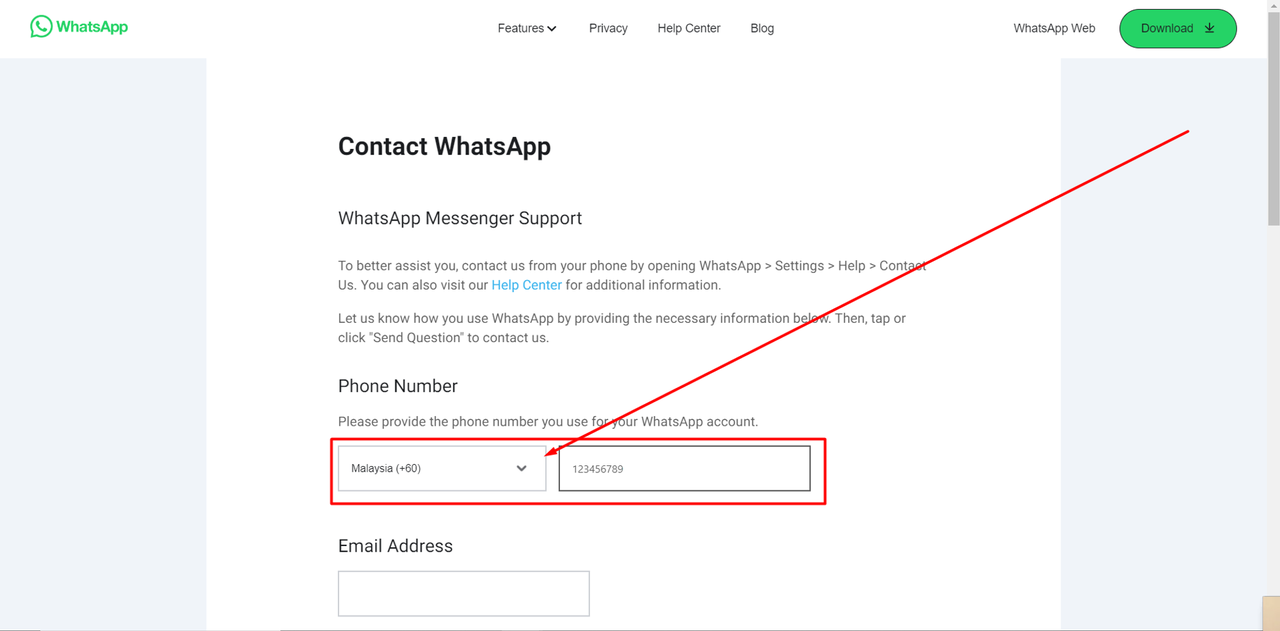
You can also reach out to WhatsApp by visiting the official WhatsApp website.
-
Please fill in the Phone Number that you are using for the WhatsApp banned: 👇🏻
-
Fill in the email address
-
Confirm the email address
-
Describe your situation in the provided space clearly and concisely in the "Please enter your message below" column.