
How to export Chat History from a chat?
Exporting chat history allows you to save conversations from your messaging platform, providing a record of your communication for reference or backup purposes.
Updated Nov 21, 2025
Exporting chat history allows you to save conversations from your messaging platform, providing a record of your communication for reference or backup purposes.
Steps
- On ChatDaddy page “Inbox”, select the chat that you want to export.
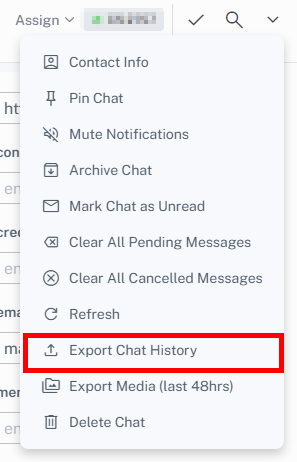
- Click the drop-down 🔽 in the top right side corner.
- Click the ”Export Chat History” button and users will be able to export chat history in a text file. ❗Please Note: This action can be performed for a single chat and is not available for bulk actions. Users cannot bulk export chat history.
Was this article helpful?