
Call Logs
The Call Logs page allows you to review all the calls made and received, with detailed information about each call. This page includes filtering options, a…
Overview
The Call Logs page allows you to review all the calls made and received, with detailed information about each call. This page includes filtering options, a comprehensive list of call logs, and the ability to view detailed call information.
Call Logs List
The list of call logs includes the following columns:
- Contact Name: The name of the contact.
- To (Number of Contact): The phone number of the contact called.
- From (Number Used to Call): The phone number used to make the call.
- Date: The date and time when the call was made.
- Duration: The duration of the call.
- Recording: A button to download the recording if the call was recorded.
- Call Notes: Any notes taken during the call.
Viewing Call Details
Clicking on a call log entry opens the call details, as shown in the image below:
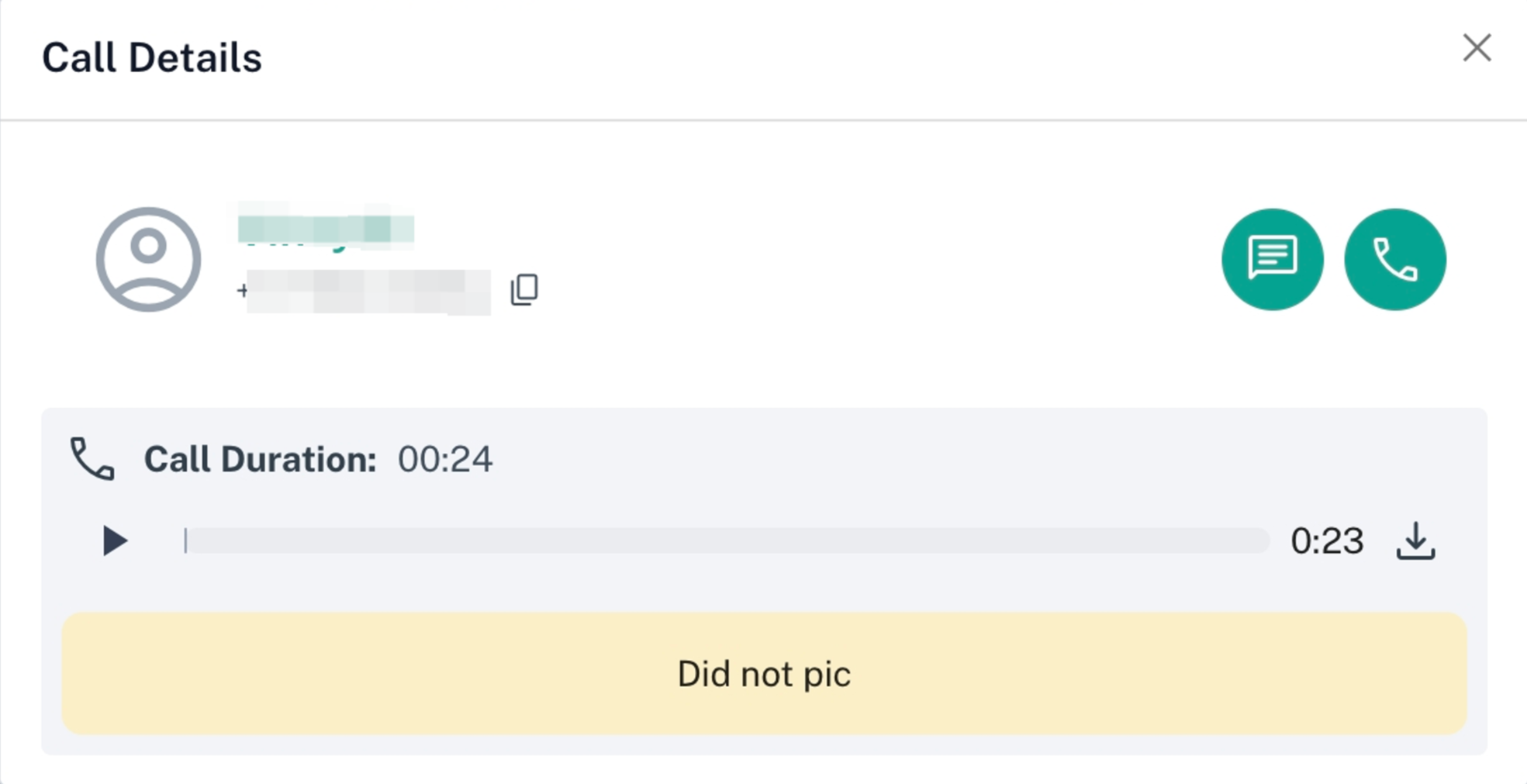
The call details include:
- Contact Information:
- Contact name and phone number.
- Options to go to their chat in the inbox page or make another call.
- Call Recording:
- An audio player to play the recording (if the call was recorded).
- A download button to download the recording.
- Call Notes:
- Displays the call notes if they were taken.
- If no notes were taken, it will display "No call notes available!"
Important Notes: • The entries with a duration and no recording are calls where the record call toggle was turned off. • Entries that have a recording, but no duration are calls that were placed and then immediately cut. There will still be a very small recording made by our calls API provider.