
How to use Chat Actions
Learn how to pin/archive/delete chats, mute chat notifications, clear pending messages for a particular chat etc.
Updated Nov 21, 2025
To use any of the following options, simply go to the Inbox section of ChatDaddy and right-click the chat that you want to perform the action on.
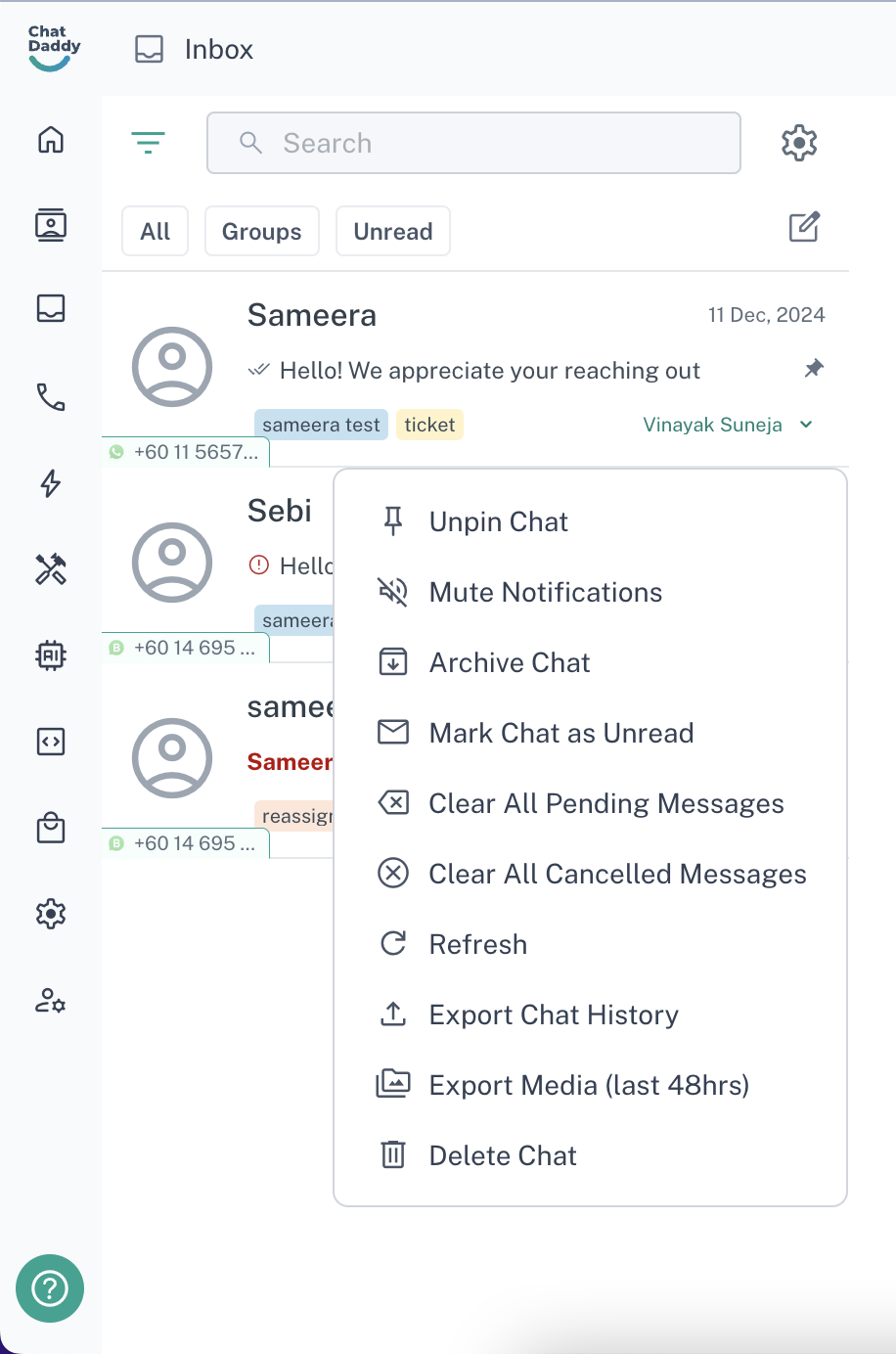
Available Chat Actions
Pin/Unpin Chat
- Pin: Keeps the chat at the top of your inbox for easy access, regardless of incoming messages.
- Unpin: Removes the chat from the pinned section, allowing it to return to its original position in the inbox.
Mute/Unmute Notifications
- Mute: Temporarily disables notifications for the selected chat, so you won't be alerted about new messages.
- Unmute: Re-enables notifications, so you can receive alerts for new messages in the chat.
Archive Chat
- Archive: Moves the chat to the archive, keeping it out of your main inbox but retaining all the chat data for future reference.
Mark Chat as Unread/Read
- Mark as Unread: Resets the chat’s status, marking it as unread and highlighting it as a new message in your inbox.
- Mark as Read: Marks the chat as read and removes any unread message indicator.
Clear All Pending Messages
- Clear Pending: Removes all pending (delayed) messages from the chat, ensuring no delayed actions are left.
Clear All Cancelled Messages
- Clear Cancelled: Deletes all cancelled messages in the chat, whether manually or automatically cancelled via message flows.
Refresh
- Refresh: Reloads the chat, ensuring that all messages and updates are current.
Export Chat History
- Export: Allows you to download the entire chat history for record-keeping or analysis purposes.
Export Media (Last 48 Hours)
- Export Media: Downloads all media files (images, videos, documents) shared within the last 48 hours in the chat.
Delete Chat
- Delete: Permanently deletes the chat and all its messages.
This will delete the chat and its message contents from WhatsApp on your mobile as well
Was this article helpful?