
How to install Google Form
Tired of manually notifying individuals after they submit a Google Form? This automation module streamlines your process by automatically sending…
Intro
Tired of manually notifying individuals after they submit a Google Form? This automation module streamlines your process by automatically sending personalized messages to specified recipients.
Steps
Prepare Your Google Form
-
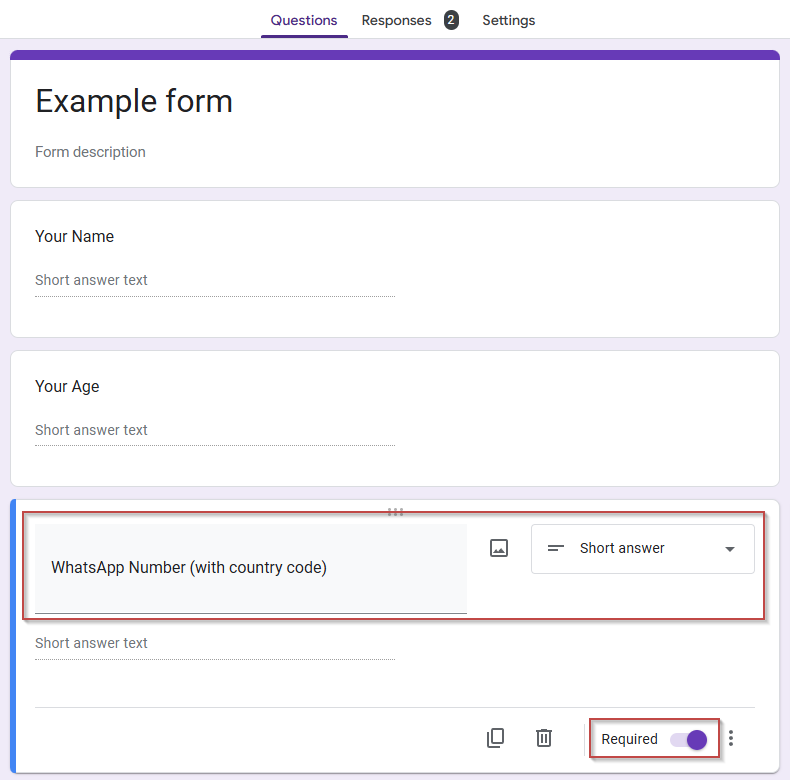
Add the necessary questions to collect the information you need from your clients. For example, you might include questions for their name, email address, and any other relevant details.
-
Add a question for the WhatsApp number. This is crucial for our automation. Create a short-answer question and label it "WhatsApp Number (with country code)".
-
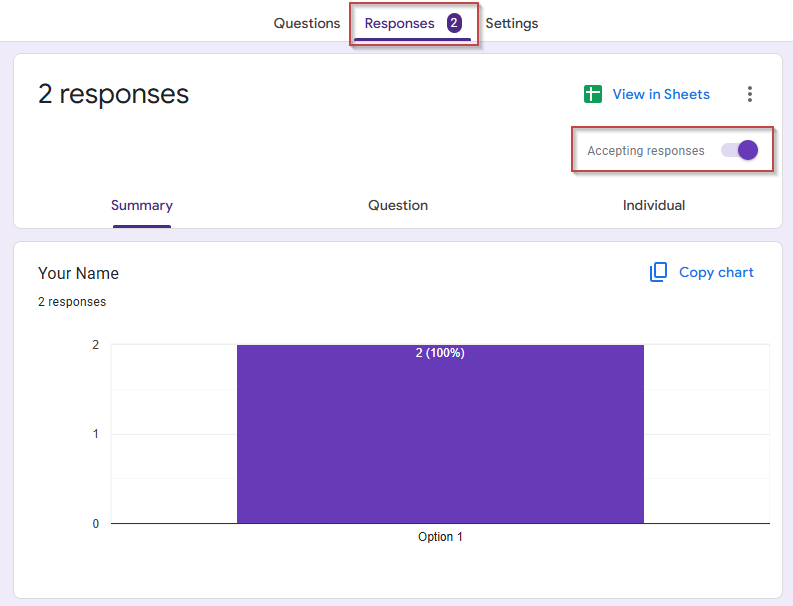
Make sure "Accepting responses" is turned on in the "Responses" section.
Share your form to our automation system
-
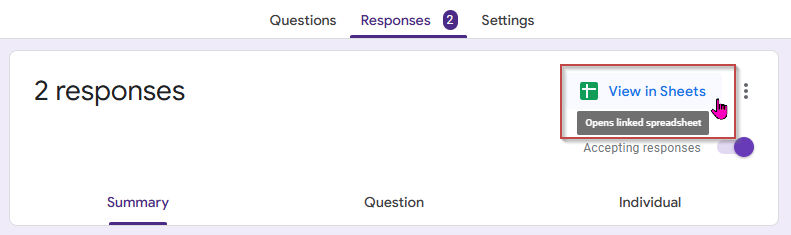
Go to the Google Sheet linked to your form.
-
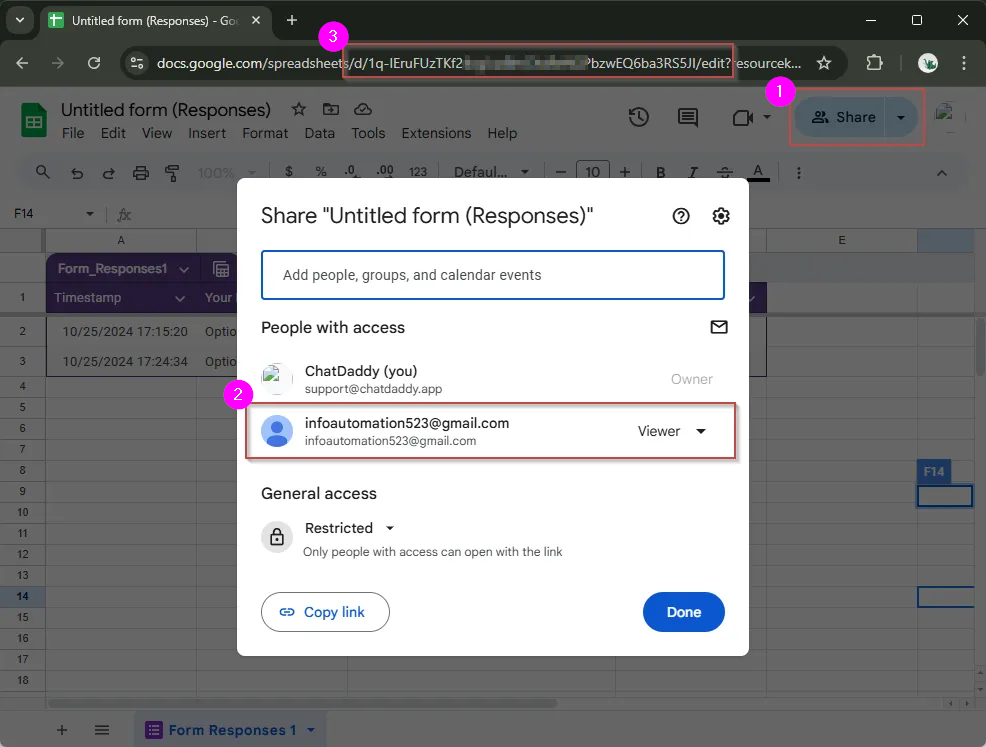
Click "Share", enter the email address “infoautomation523@gmail.com”, and set the access level to "Viewer.” Note: No pending accept needed
-
Copy the spreadsheet ID and save it for later use. It is the string of characters that appears between d/ and /edit in your spreadsheet URL.
Warning: Modifying the titles or values in the Google Sheet will disrupt the entire integration and require a reset. Do not make any changes to the Google Sheet titles or values.
Set Up a Custom Message in Message Flow
- In ChatDaddy, go to Automation > Message Flow > + Create New Flow.
- For Google Form notifications, you can use any variable from your spreadsheet. Using the example google sheet above, available variables include: {{Your Name}}and {{Your Age}}.
- Here's how your template might look:
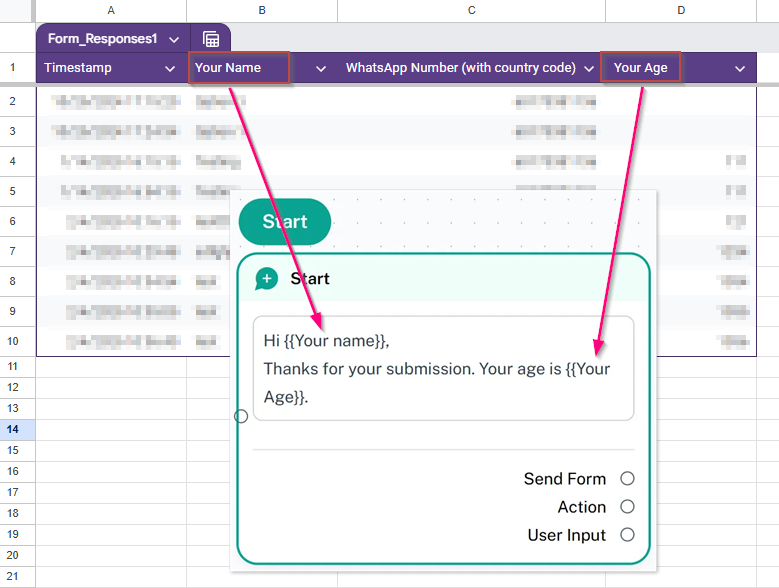
Hi {{Your name}}, Thanks for your submission. Your age is {{Your Age}}.
- Click "Save" after setting up your message template.
Set Up ChatDaddy Notification
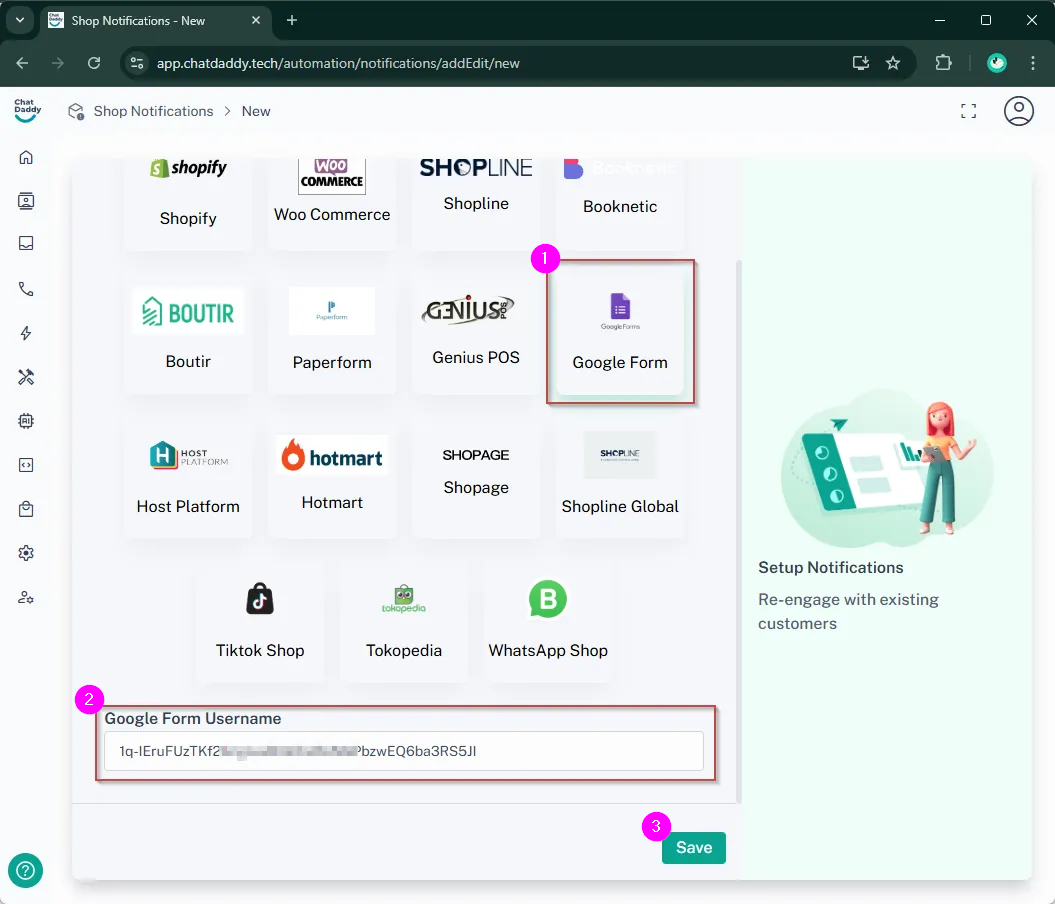
- In ChatDaddy, go to Automation > Shop Notifications > + Create.
- Select "Google Form" as the trigger.
- Enter the spreadsheet ID you copied earlier. This is the string of characters between d/ and /edit in the spreadsheet URL.
- Click "Save".
Configure Notification Settings
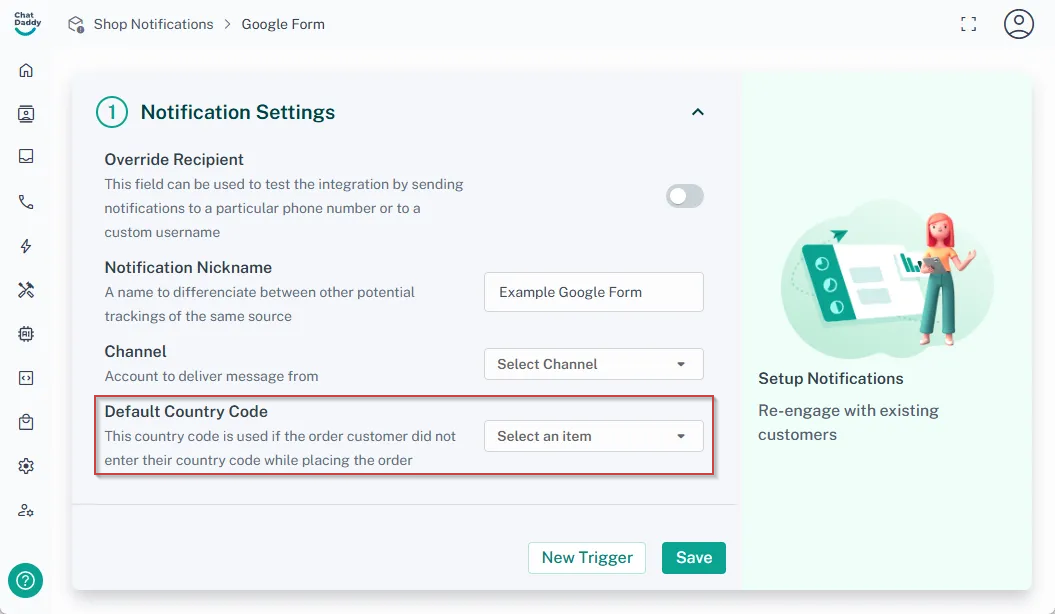
- Keep "Override Recipient" disabled if you have labeled the column "WhatsApp Number (with country code)" in your spreadsheet.
- Enter your preferred notification name in the field "Notification Nickname"
- Choose which channel you want to send messages from in the "Channel"
- Select the default country code in the "Default country code"
Set Up a Custom Trigger for Google Form Submissions
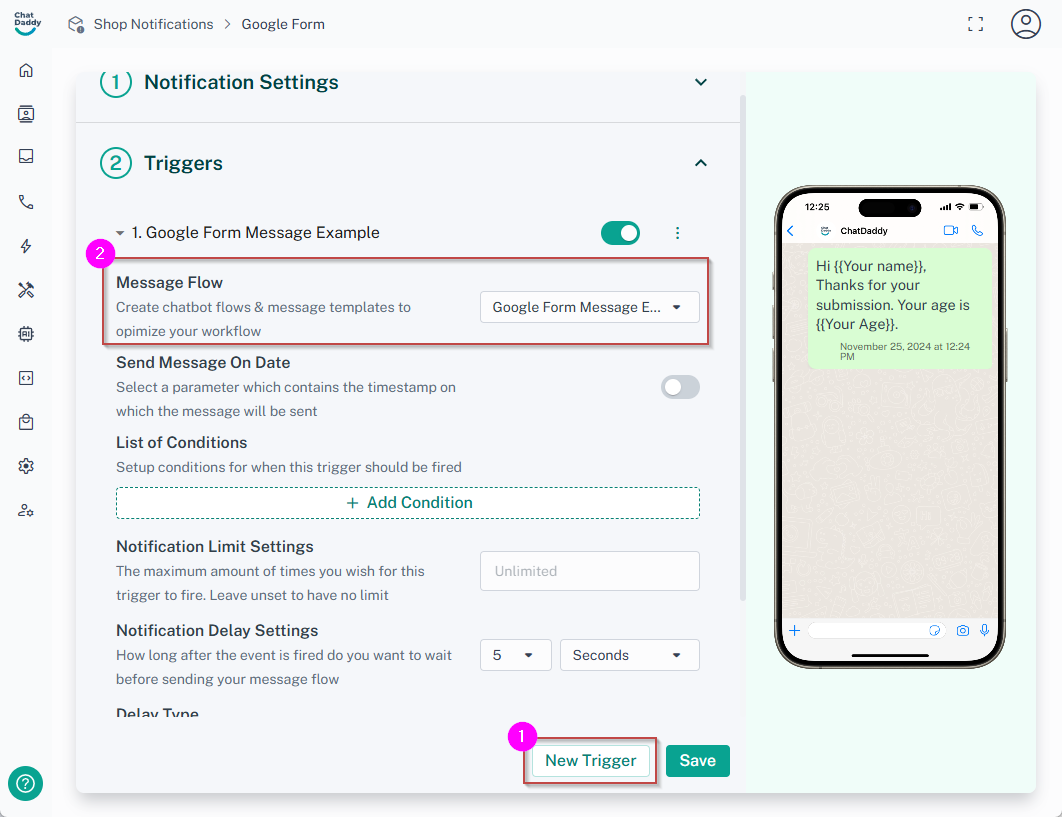
- Click "New trigger"
- Expand the trigger section
- Select the message flow you just set up
- Click "Save".
Enable and Test Output
- Submit a test Google form using your own phone number to verify the setup.
- Verify that you receive the notification.
- That's it! Your setup is complete. From now on, whenever someone submits your Google Form, ChatDaddy will automatically send them a notification using your template.
Note: Notifications are typically delivered within 5-10 minutes, though timing may vary. If no notification arrives after 30 minutes, please review your configuration settings. Contact our support team if issues persist.
**Limitation Notice: Shop notification is limited to capturing a maximum of 26 columns from the linked Google Sheet or Form. To ensure critical information is collected, essential details such as contact information should be placed within the first 26 columns and prioritized before any additional data fields.
**
FAQs
Why isn't my automation sending messages even though I've set up all triggers and message flows correctly?
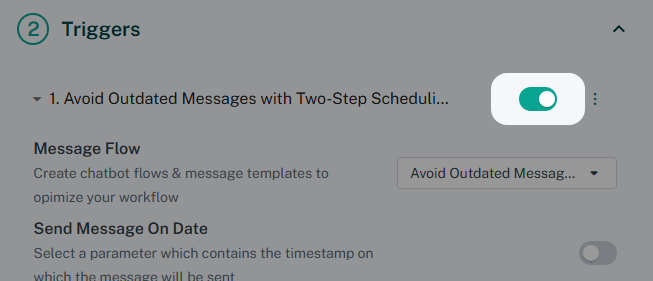
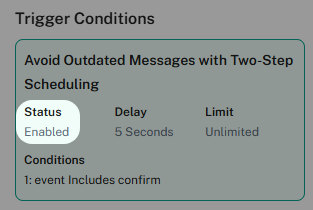
Answer: Double-check that the trigger switch is turned on. You can refer to the provided image for confirmation.
Why can't I get the trigger in ChatDaddy?
Answer: Our system only tracks the first sheet in your Google Sheet. If your data sheet is not the first tab, the trigger will not function. Ensure the sheet you intend to use for triggering is the leftmost tab in your Google Sheet.

Why am I not getting any notifications?
Answer: Notifications are typically delivered within 5-10 minutes, although delivery times can vary. If you have not received a notification after 30 minutes, please carefully review your integration and notification configuration settings. If the problem persists, contact our support team for assistance.
Can I edit the form questions or change the Google Sheet format/view?
Answer: No. Editing form questions or altering the Google Sheet's structure (e.g., adding/removing columns, changing column order) will disrupt the Google Form integration and result in unexpected behavior. You will need to recreate the integration from scratch.
Can I delete testing data from the sheet?
Answer: No. Deleting data directly from the Google Sheet will break the Google Form integration and lead to unexpected behavior. If you need to remove test data, it is recommended to create a new sheet, test it, and then implement it to your live sheet. If you delete data from the original linked sheet, you will need to recreate the integration from scratch.