
How Much Each Channel Costs in Credits Before You Connect
Every channel on the Connect Channel screen shows its monthly credit cost before you connect it. Learn what each type costs, why your first channel is often free, why the price goes up with each extra channel, and what happens if your balance is short.
Also searched as: How Much Each Channel Costs in Credits Before You Connect, Where to find it, What each channel type costs, Why the price climbs with each extra channel, If your balance is too low, Much, Each, Channel, Costs, Credits, Before, Connect
Connecting a channel uses credits every month, so ChatDaddy shows the price on the channel card itself — before you click anything. No surprise deduction after the fact.
💡 The number on a card is your price for the next channel of that type, not a fixed list price. It goes up with each channel of the same type you already have, and your first WhatsApp, Instagram or Messenger channel costs 0 credits.
Where to find it
Open Manage Channels from the left sidebar and click Add Channel. The Connect Channel dialog lists every channel type you can connect, and each card carries its cost under the name, marked credits/mo.
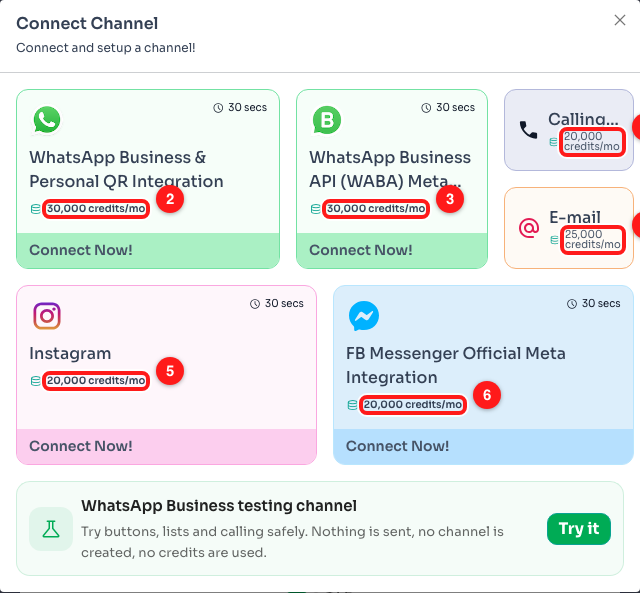
Every card shows its own monthly credit cost (1–6). These are the prices for this particular account — yours may differ, see below.
What each channel type costs
Three of the channel types get cheaper the fewer you have, because the first one is free. The rest are a flat monthly price:
- WhatsApp (QR integration) — 1st channel free, then 15,000 → 20,000 → 25,000, and 30,000 credits/mo for the fifth and every one after.
- Instagram and Facebook Messenger — the same ladder: 1st free, then 15,000 → 20,000 → 25,000 → 30,000 credits/mo.
- WhatsApp Business API (WABA) — a flat 30,000 credits/mo, from the first one.
- E-mail — a flat 25,000 credits/mo.
- Calling — starts at 20,000 credits/mo, rising to 25,000 and 30,000 for additional numbers.
🧪 Want to try the interface without paying anything? The WhatsApp Business testing channel at the bottom of the dialog costs nothing: no channel is created, nothing is sent, and no credits are used. Good for practising with buttons, lists and calling.
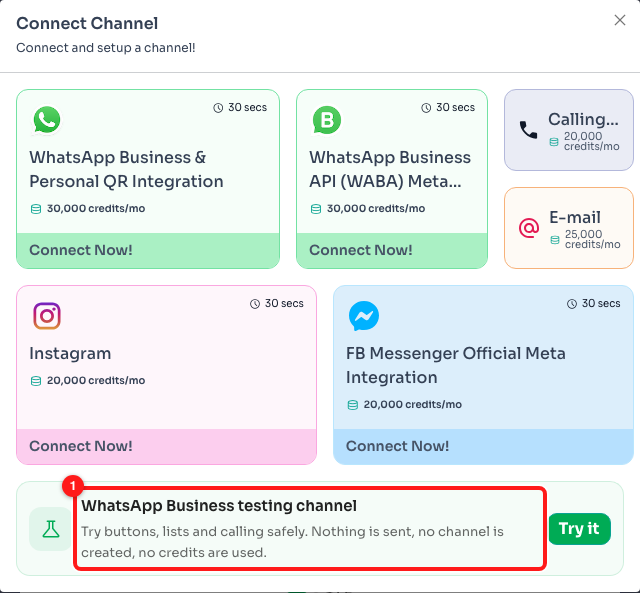
The testing channel (1) is free — use it to explore before committing credits.
Why the price climbs with each extra channel
The cost is worked out from how many channels of that same type you already have connected. So a business with one WhatsApp number sees 15,000 on the WhatsApp card, while a business with four sees 30,000. Connecting a different type starts that type at its own first-channel price — having three WhatsApp channels does not make your first Instagram channel more expensive.
If your balance is too low
On a credit-based account, ChatDaddy checks your balance before it starts connecting. If it is short you get an Insufficient Credits dialog — “You need more credits to connect this channel” — with the option to go straight to Billing and top up. Nothing is half-connected and nothing is charged.
📋 On a plan, this pre-check does not apply. How many channels you can connect is set by your plan's channel limit instead; anything beyond that limit is billed monthly from your wallet at the overage rate. If the wallet cannot cover it, you are sent to the top-up dialog at that point.
Frequently asked questions
Is this a one-off charge or every month?
Monthly — that is what credits/mo means. The channel keeps costing that many credits per month for as long as it stays connected.
I disconnected a channel. Does my next one get cheaper again?
The price is based on how many channels of that type you currently have, so reducing your channel count lowers the price shown for the next one. Reopen the Connect Channel dialog to see the current figure.
Why does a card show no price at all?
A card with no credits line is free for you right now — usually because it would be your first channel of that type.
Where do I check my credit balance?
Your balance is shown in the top bar of the app, and in full under Settings → Billing, where you can also top up.