
My WhatsApp Channel Keeps Disconnecting
A channel showing Disconnected means ChatDaddy has lost its link to that account, so you can't send or receive on it until it's reconnected.
Updated Jul 10, 2026
A channel showing Disconnected means ChatDaddy has lost its link to that account, so you can't send or receive on it until it's reconnected.
Common causes
- The linked phone lost internet or was turned off for a long time.
- WhatsApp was opened on too many linked devices and dropped the oldest one.
- The number was logged out of Linked Devices on the phone.
- The phone's WhatsApp app was reinstalled or the account was moved.
How to fix it
-
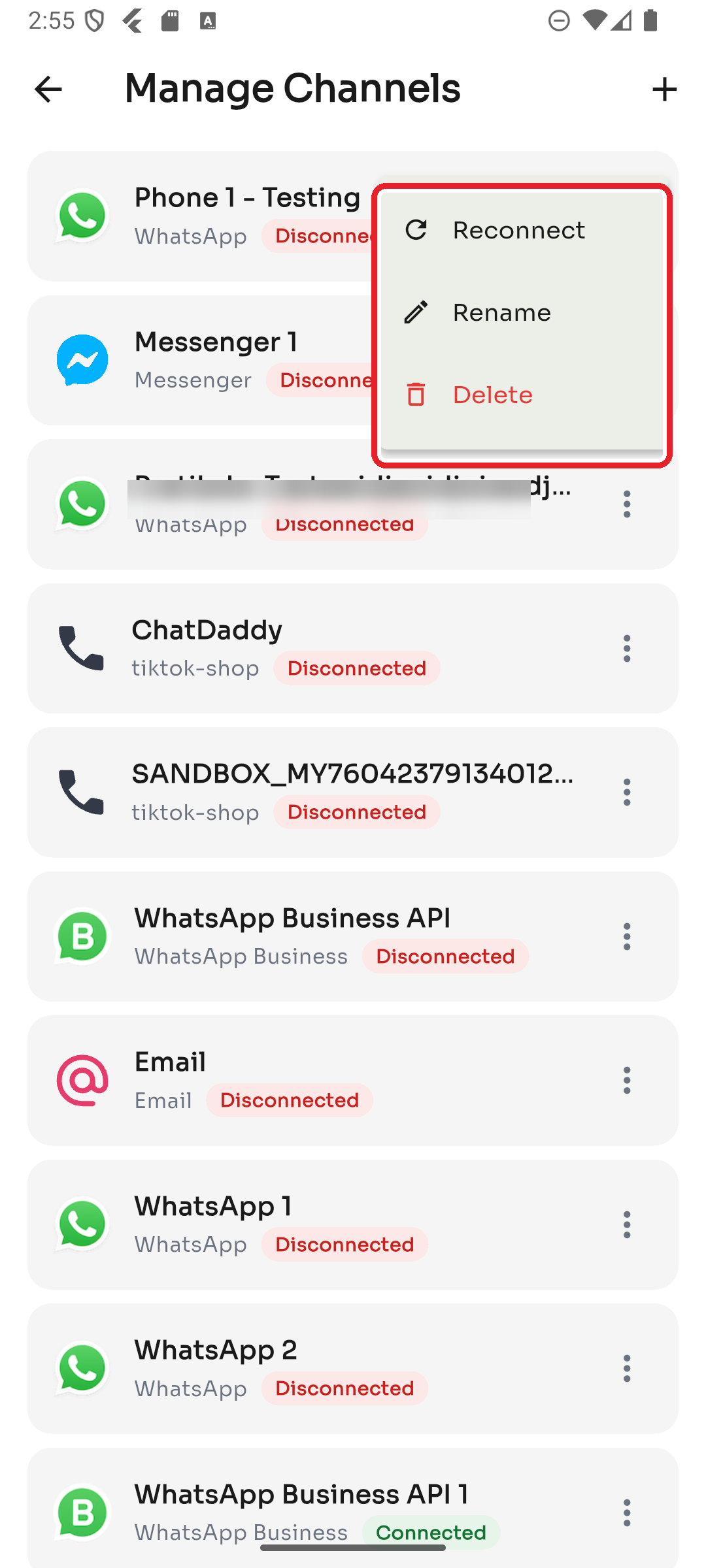
Go to Settings → Manage Channels.
-
Tap the ⋮ menu on the disconnected channel and choose Reconnect.
-
For WhatsApp, link it again with the 8-digit pairing code (or QR) — make sure the phone with WhatsApp is nearby and online.
If it keeps happening
- Keep the linked phone online and charged — ChatDaddy relies on it staying connected.
- Don't exceed WhatsApp's linked-device limit; remove old/unused linked devices in WhatsApp → Linked Devices.
- If a channel disconnects repeatedly right after reconnecting, contact support with the channel name and time it dropped.
Was this article helpful?