
Reactions, Pins, GIFs and Other Message Types That Do Not Sync
Some things a customer sends never reach ChatDaddy, so the Inbox shows a grey note in place of the message. Here is what each note means for reactions, pinned messages, GIFs, group invites, link previews, missing media, interactive messages and cart or product messages — and what to do about it.
Also searched as: Reactions, Pins, GIFs and Other Message Types That Do Not Sync, Spot the note in the conversation, Click “Why?” for the full explanation, The three you can safely ignore, The four to ask for in another form, The two that only the phone can show, Reactions, Pins, GIFs, Other, Message, Types, Sync
WhatsApp lets your customers send more kinds of message than the WhatsApp Business API can pass on to a tool like ChatDaddy. When one of those arrives, the Inbox does not go blank and it does not show you a raw error — it shows a short grey note in place of the message, saying which type it was.
This article covers nine of those notes. If you are looking for polls, edited messages, View Once photos or live location instead, see Understanding WhatsApp Limitation Cards.
ℹ️ These notes are not errors and nothing is broken on your side. The message really was sent, it simply never left WhatsApp — so there is nothing to retry and no support ticket to raise. Everything is still readable in the WhatsApp Business app on the phone.
When you will see this
These notes appear in the conversation pane of the Inbox, on channels connected through the WhatsApp Business API. They only ever apply to messages your customer sends to you — they are never a sign that one of your own messages failed to send. A failed send looks different and is covered in Understanding WhatsApp Send Error Cards in the Inbox.
Step-by-step
Step 1 — Spot the note in the conversation
Instead of the message you get a single grey italic line with a small icon, naming what came through — for example “Pinned messages don't sync”. Next to it is a Why? link.
The line is deliberately quiet rather than a big red box, because a busy chat can collect several of these and none of them need your attention.

Step 1 — the grey note that replaces the message (1), with the Why? link beside it (2).
Step 2 — Click “Why?” for the full explanation
Clicking Why? opens a small card with the same three sections used everywhere else in ChatDaddy: Why this happens, What can you do? and a Read more link. The Read more link goes to Meta's own documentation for that message type.
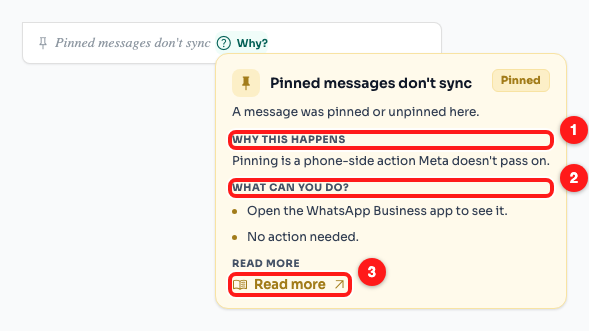
Step 2 — the explanation card: why it happened (1), what you can do (2) and Read more (3).
💡 The card opens on hover and on click, so it works the same on a laptop and on a tablet. Click anywhere else to close it.
Step 3 — The three you can safely ignore
These are actions your customer took on the chat rather than messages they sent you. Nothing has been lost and there is nothing to reply to.
- Pinned messages don't sync — someone pinned or unpinned a message. Pinning happens on the phone and WhatsApp does not pass it on.
- Reaction can't be shown — a customer reacted (👍, ❤️ and so on) to a message that itself never arrived here, so there is nothing for the reaction to attach to.
- Kept a disappearing message — someone chose to keep a disappearing message in the chat. Again, an action on the chat, not a message.
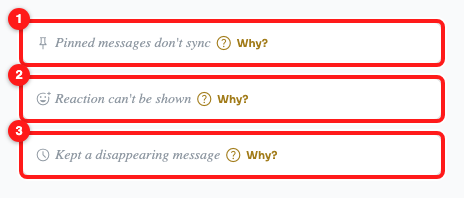
Step 3 — pinned (1), reaction (2) and kept disappearing message (3). All three say “No action needed.”
Step 4 — The four to ask for in another form
Here the customer did send you something, and it did not come through. The quickest fix is to ask for it again in a format the API does carry.
- Animated GIF isn't supported — an MP4 video arrives perfectly well, so ask for a video instead.
- Media isn't available — WhatsApp sent a placeholder with no file behind it, usually because the media expired or the upload never finished. Ask the customer to send the file again.
- Link preview only — the message held nothing but a link-preview card and no text of its own. Ask for the link as plain text.
- Group invite link — a WhatsApp group invite. Join or decline it from the phone.
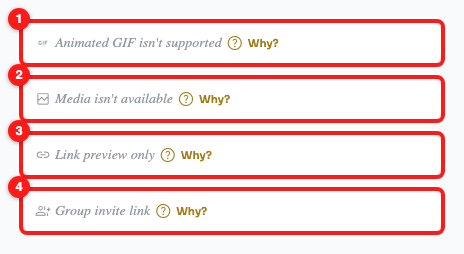
Step 4 — animated GIF (1), missing media (2), link preview only (3) and group invite (4).
Step 5 — The two that only the phone can show
These are rendered by the WhatsApp app itself rather than sent as content, so no tool connected to the API can rebuild them.
- Interactive message can't be shown — buttons, a list, or an older-style template message. Only whoever created it can re-render it, so ask the customer to reply in plain text.
- Cart or product message — a cart, an order, or a product card from a WhatsApp catalogue. Ask the customer to confirm the items in a normal message so you have them in writing.
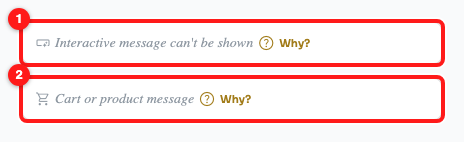
Step 5 — interactive message (1) and cart or product message (2).
Frequently asked questions
Is the message lost forever?
No. It is still in the conversation in the WhatsApp Business app on the phone the channel is connected to. Only the copy that would have come to ChatDaddy is missing.
Can I retry or refresh to make it appear?
No, and there is no retry button for this reason. WhatsApp never sent the content, so refreshing the page, resyncing the channel or reconnecting it will not bring it back.
Can I send a poll, a GIF or a cart from ChatDaddy?
Not on a WhatsApp Business API channel — the same limits apply in both directions. Use reply buttons or a list instead of a poll, and send an MP4 instead of a GIF. What you can and cannot send is listed in “What You Cannot Send on a WhatsApp Business API Channel”.
Why did a reaction show up in one chat but not another?
A reaction can only be shown when the message it reacts to arrived here too. React to a normal text message and it comes through; react to a poll or a View Once photo — neither of which reaches ChatDaddy — and you get this note instead.
Does this happen on personal WhatsApp channels as well?
Much less often. These limits come from the WhatsApp Business API, so a channel connected by QR code receives several of these types normally. If you see the notes constantly, check which kind of channel the chat belongs to on the Channels page.
A note appeared and I cannot tell what the message was.
Sometimes WhatsApp tells us only that an unsupported message arrived, without naming the type. In that case the note reads “Message can't be shown here”. Open the chat on the phone to see what it actually was.