
What You Cannot Send on a WhatsApp Business API Channel
A WhatsApp Business API channel will not send polls, product messages or voice notes, cannot edit a message once it has gone out, and stops sending anything free-form once the 24-hour window closes. Calling also fails on a coexistence number. Here is each limit, why it exists and what to do instead.
Also searched as: What You Cannot Send on a WhatsApp Business API Channel, Two different kinds of "no", Open the testing channel, See why polls are missing, Watch the 24-hour window close, Check the calling rule before you dial, The limits you meet outside the testing channel, Voice notes, Product and catalogue messages, Editing a message you have already sent, Quick reference, Cannot, Send, WhatsApp, Business
A WhatsApp Business API (WABA) channel is the official Meta channel — the one that gives you templates, a verified business name and higher sending limits. In exchange, Meta decides what may be sent through it, and a handful of things you can do on a personal WhatsApp number simply do not exist here.
This article is for anyone who has just connected a WABA channel and found a button greyed out, or watched a message fail with no obvious reason. Each limit below is a rule on Meta's side, not a ChatDaddy setting, so none of them can be switched on — but every one of them has a workaround.
🚫 Six limits, in short: no polls, no product or catalogue messages, no voice notes, no editing a message you have already sent, nothing free-form once the 24-hour window closes, and no calling from a coexistence number.
Two different kinds of "no"
It is worth separating them, because the fix is different:
- Not supported — WhatsApp Business API has no such message at all. Nothing you change about the message will get it through; you need a different kind of message, or a personal (QR-linked) channel.
- Needs a template — the content itself is deliverable, just not as an ordinary free-form message. Move it into an approved WhatsApp template and it sends normally. The 24-hour window is the main one of these.
ℹ️ Wherever ChatDaddy blocks something, it labels it with one of those two words and offers a Why? or Read more link with the reason and the alternative. You do not have to memorise this list — the app tells you at the moment it matters.
Step-by-step
You can see most of these limits for yourself without a WABA channel and without risking a real customer. ChatDaddy ships a WhatsApp Business testing channel — a simulated inbox that enforces exactly the same rules. Nothing is sent, no channel is created and no credits are used.
Step 1 — Open the testing channel
Go to Manage Channels and click Add Channel. At the bottom of the Connect Channel dialog, below the real channel types, sits the WhatsApp Business testing channel card. Click Try it.
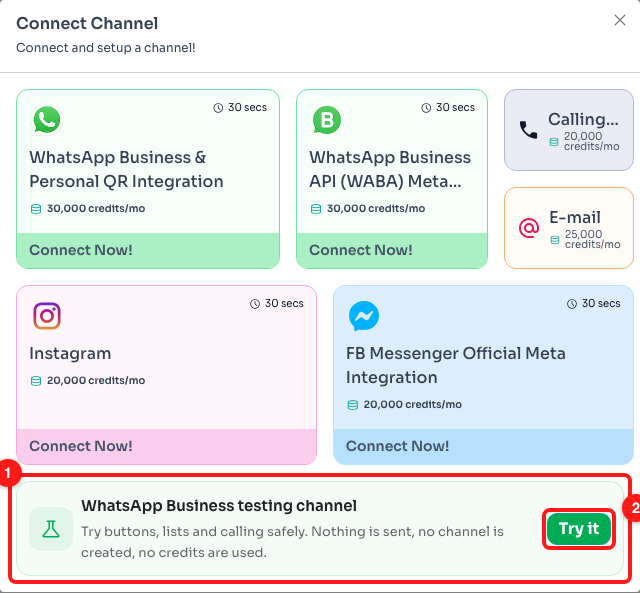
Step 1 — the testing channel card at the bottom of Connect Channel (1) and its Try it button (2).
Step 2 — See why polls are missing
The testing channel opens as an Inbox. Click the + inside the message box to see everything you can attach to a WhatsApp message. Poll is there, greyed out — hover it and the card explains that WhatsApp Business API has no poll message type at all.
Instead of a poll, ask the question with reply buttons (up to three) or a list (up to ten rows). Both give you a clean, tappable answer, and both work on a WABA channel. If you genuinely need a poll, send it from a personal (QR-linked) WhatsApp channel.
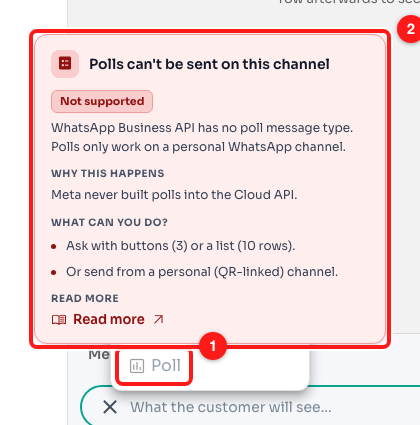
Step 2 — Poll sits in the “+” menu but is disabled (1), and hovering it shows why, along with what to use instead (2).
Step 3 — Watch the 24-hour window close
Open the Testing tab in the right-hand panel and switch 24-hour window off. The card flips to "Closed — only templates deliver", and a Needs a template row appears beneath it.
This is the limit people meet most often. WhatsApp only lets you send free-form messages within 24 hours of the customer's last reply. After that, an approved template is the only thing that will be delivered — and the moment the customer replies to it, the window reopens and normal messages work again.
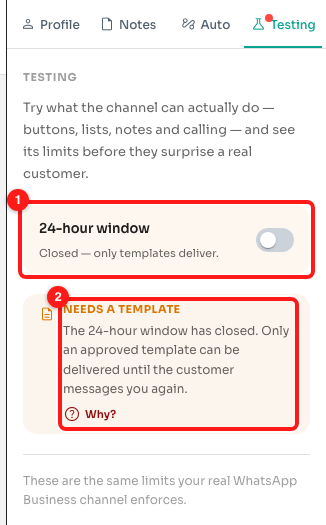
Step 3 — the 24-hour window switched to Closed (1) and the "Needs a template" explanation it triggers (2).
📝 Internal notes are the exception. A note is stored on the chat for your team and never reaches WhatsApp, so the 24-hour window cannot stop it. You can always leave a note, whatever the channel is doing.
Step 4 — Check the calling rule before you dial
Click the call icon in the conversation header to walk through a simulated call. The first step is the one that surprises people: on WhatsApp Business API you cannot call a customer out of the blue — they have to grant call permission first, and that permission expires.
Under that sits the warning that matters for this article. Calling only works on a full WhatsApp Business API number. On a coexistence number — one still signed in to the WhatsApp app on a phone — the call is placed as normal and then rejected by Meta. Call from a full Business API number, or migrate the number off coexistence.
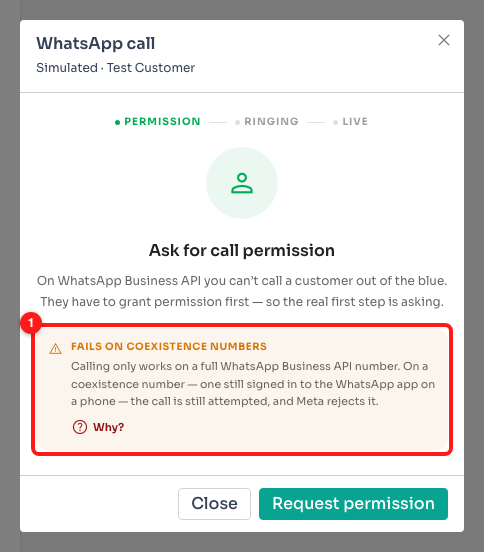
Step 4 — the coexistence warning on the call screen (1), with a Why? link to the full explanation.
The limits you meet outside the testing channel
Three more rules show up where you build and send real messages rather than in the simulator.
Voice notes
A recorded voice note cannot go out over WhatsApp Business API. In a message flow, the Voice Note tile in the message step is flagged, and a flow that carries one will not send that message when it runs on a WABA channel.
Record the audio and attach it as an ordinary audio file instead, or write the message as text.
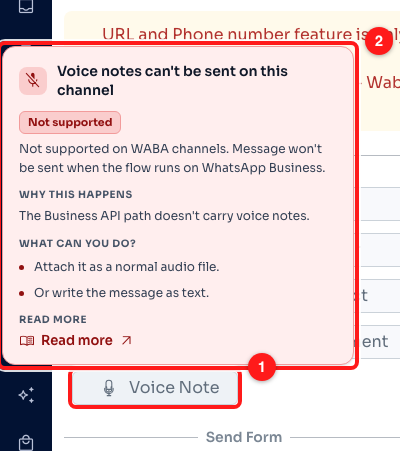
Voice Note in a message flow's attachment grid (1), with the reason and the alternative on hover (2).
Product and catalogue messages
Product cards pulled from a catalogue are rejected on a WABA channel too — they need a WhatsApp Shop on the number, so ChatDaddy stops them before they are sent rather than letting Meta bounce them.
Send the product details as a normal message with a photo, or use a list if you want to offer several products for the customer to pick from.
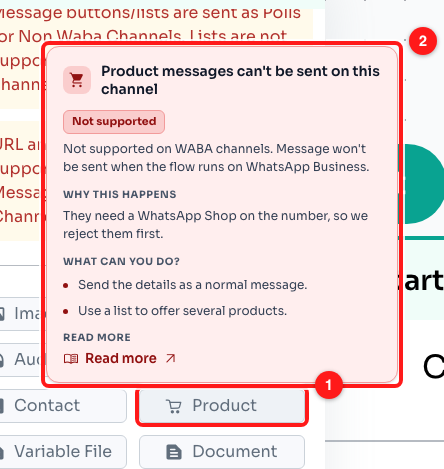
The Product tile in the same grid (1) and the card explaining why it will not send (2).
Editing a message you have already sent
On a personal WhatsApp channel you can edit your own message for a short while after sending it. On a WABA channel you cannot: Meta's Cloud API has no edit endpoint at all. Open the ⋯ menu on one of your own sent messages in the Inbox and Edit is there but greyed out, with the reason on hover.
Send a short follow-up with the correction. If the original would confuse someone reading the thread later, delete it — deleting still works.
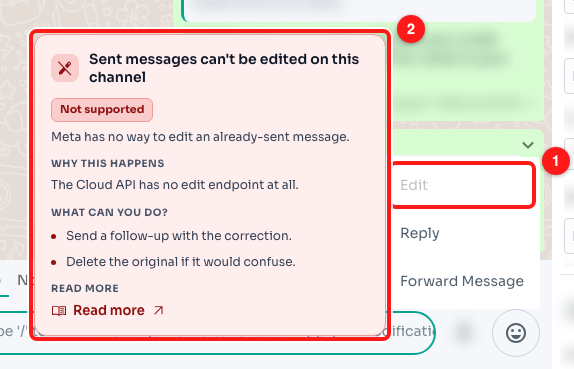
Edit greyed out on a sent WhatsApp Business API message (1), and the card that explains why (2). Customer details are blurred in this screenshot.
Quick reference
- Poll → ask with up to 3 reply buttons or a 10-row list, or send from a personal channel.
- Product / catalogue message → send the details as a normal message, or offer them as a list.
- Voice note → attach it as a normal audio file, or write it as text.
- Editing a sent message → send a follow-up correction; delete the original if needed.
- 24-hour window closed → send an approved template; their reply reopens the window.
- Calling on a coexistence number → call from a full Business API number, or migrate off coexistence.
Frequently asked questions
Can any of these be switched on for my account?
No. They are rules on Meta's side of the WhatsApp Business API, not ChatDaddy settings, so they apply to every provider and every account equally. The only ones that change are the ones tied to your number: calling starts working once the number is a full Business API number rather than a coexistence one.
What is a coexistence number?
It is a number connected to the WhatsApp Business API while still signed in to the WhatsApp Business app on a phone — so your team can use both. It is a real and supported setup, but a few features are unavailable on it, and calling is one of them: the call is attempted and Meta rejects it.
My message failed and I do not know which rule it broke.
A refused message comes back with a card underneath it in the conversation, naming the rule and what to do instead. If you want to test a draft before sending it, rebuild it in the WhatsApp Business testing channel — the Testing tab lists everything a real channel would object to.
Do these limits apply to my personal WhatsApp channel too?
Mostly not. A personal (QR-linked) channel can send polls and voice notes, and can edit a sent message for a short period. The 24-hour window is a WABA rule and does not apply there either. That is why a message flow that runs on both channel types warns you when it contains something only one of them can send.
Does the testing channel send anything or cost credits?
No. It is a simulation: no channel is created, no message or note is sent, no call is placed and no credits are used. It enforces the same limits as a real WhatsApp Business API channel, which is what makes it a safe place to try them.
The customer has not replied in days. How do I reach them?
With an approved template message. That is exactly what templates are for — they are the only thing WhatsApp will deliver outside the 24-hour window. Once the customer replies to the template, the window reopens and you can talk normally again.