
Button and List Rules in WhatsApp Messages
WhatsApp puts six hard limits on the buttons and lists you attach to a message: three buttons, 20-character titles, buttons or a list but never both, no link or call buttons outside a template, ten list rows in total, and no attachment on a list. Here is each one, and a safe place to try them.
Also searched as: Button and List Rules in WhatsApp Messages, Where these rules apply, Open the testing channel, Attach a button or a list, Add up to three reply buttons, See why a fourth button is not offered, Choose buttons or a list, never both, Keep button titles to 20 characters, Link and call buttons need an approved template, A list holds ten rows in total, The sixth rule: no attachment on a list, How ChatDaddy tells you, Button, List, Rules
Buttons and lists are the tappable options you attach to a WhatsApp message — three quick replies under a question, or a menu a customer picks one row from. You add them in the Inbox compose bar and in a message flow's message step, and they are the fastest way to get a clean answer instead of free text.
WhatsApp is strict about how they are built. Six rules decide whether your message goes out, and breaking one usually means the send is refused rather than trimmed. This article covers all six and shows you where to try them without touching a real customer.
🔘 The six rules: at most 3 reply buttons; buttons or a list, never both; free-form button titles of 20 characters or fewer; link and call buttons only inside an approved template; 10 list rows in total across every section; and no attachment on a list message.
Where these rules apply
They are WhatsApp Business API (WABA) rules, so they apply to every message you send from a WABA channel — from the Inbox, from a message flow, or from a broadcast.
- On a WhatsApp Business API channel — all six rules are enforced, and a message that breaks one is refused by Meta.
- On a personal (QR-linked) WhatsApp channel — buttons and lists are sent as a poll instead. ChatDaddy warns you about this in the message step.
- On Messenger and Instagram — list messages are not supported at all.
ℹ️ ChatDaddy stops you up front wherever it can: the flow editor and the compose bar will not let you add a fourth button, and the list editor will not let you add an eleventh row. The rules you can still trip are the ones about titles, link buttons and attachments — those only show up when the message is sent.
Step-by-step
The safest way to learn these rules is the WhatsApp Business testing channel — a simulated inbox that enforces exactly the same limits. Nothing is sent, no channel is created and no credits are used, so you can break every rule on purpose and read what happens.
Step 1 — Open the testing channel
Go to Manage Channels and click Add Channel. At the bottom of the Connect Channel dialog, under the real channel types, sits the WhatsApp Business testing channel card. Click Try it.
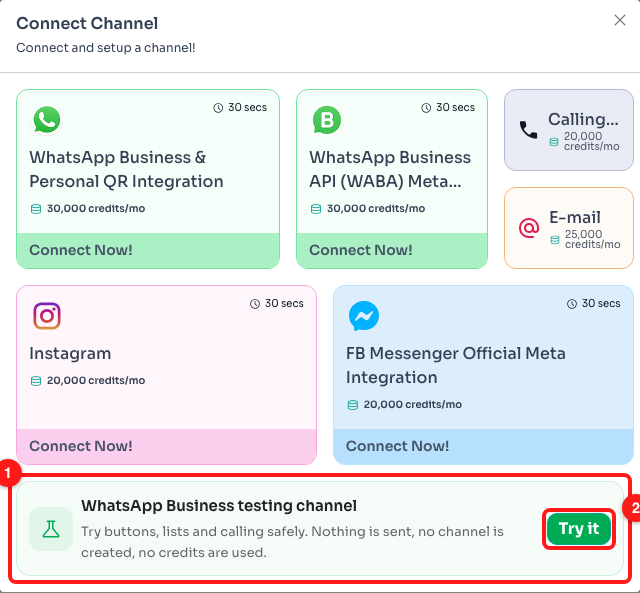
Step 1 — the testing channel card at the bottom of Connect Channel (1) and its Try it button (2).
Step 2 — Attach a button or a list
The testing channel opens as an Inbox. Click the + inside the message box to see everything you can attach to a WhatsApp message. Button and List are the two that matter here.
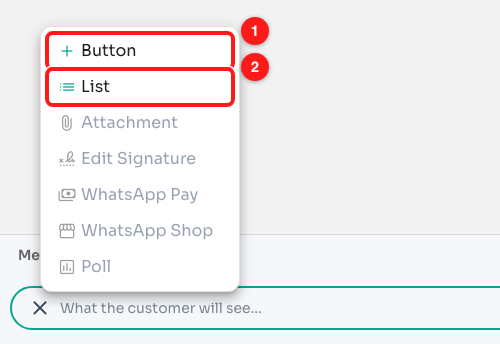
Step 2 — Button (1) and List (2) in the “+” menu. The greyed items below are demo-only in the testing channel.
Step 3 — Add up to three reply buttons
Click Button, type the wording a customer will tap, and click Add Button. Each button appears above the message box with an ✕ to remove it. Three is the ceiling — WhatsApp rejects a message with more rather than dropping the extras.
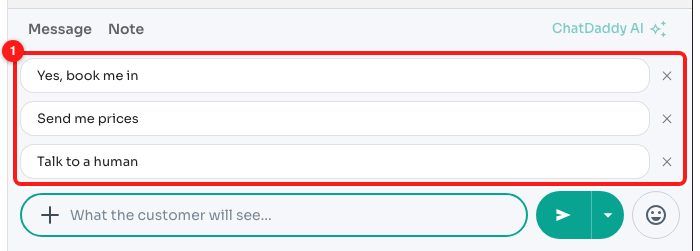
Step 3 — three reply buttons attached to the draft (1).
Step 4 — See why a fourth button is not offered
Open the + menu again. Button is now greyed out, and hovering it says why. The real Inbox compose bar and the message flow editor behave the same way, so you cannot build a four-button message by accident.
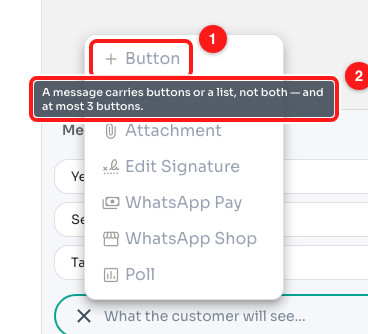
Step 4 — Button is disabled at three (1) and gives the reason on hover (2).
Need more than three options? Use a list instead — it holds ten.
Step 5 — Choose buttons or a list, never both
While buttons are attached, List is greyed out too. Buttons and lists are two different kinds of WhatsApp message, and one message can only be one of them. Remove the buttons first, or split the content across two messages.
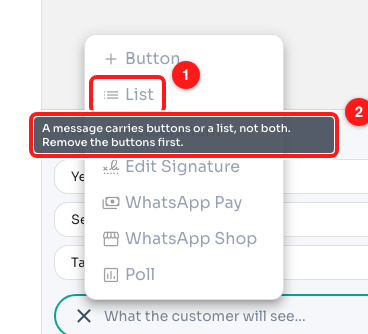
Step 5 — List is unavailable while buttons are attached (1), and says so (2).
Step 6 — Keep button titles to 20 characters
Remove the buttons and add one with a long title. Nothing stops you typing it — but open the Testing tab on the right and you will see the message flagged Needs a template. Outside an approved template, WhatsApp caps a button title at 20 characters.
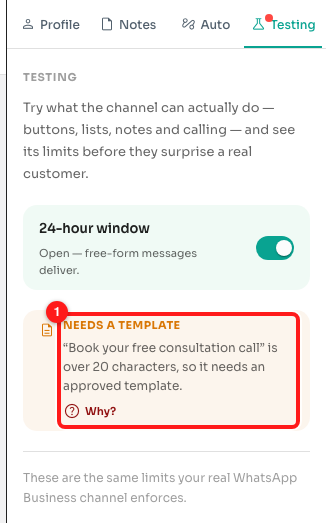
Step 6 — a 32-character button title is deliverable only inside an approved template (1). Click Why? for the full explanation.
⚠️ The Inbox compose bar accepts up to 80 characters, because that is the limit on other channels. On a WhatsApp Business API channel it warns you as you type — “Over 20 characters — won't send on this channel” — and will not let you add the button. A message flow caps button text at 20 characters outright.
Step 7 — Link and call buttons need an approved template
A button that opens a URL or dials a phone number is a template-only feature. Add one in the testing channel and the Testing tab says the same thing: only plain reply buttons work in an ordinary message.
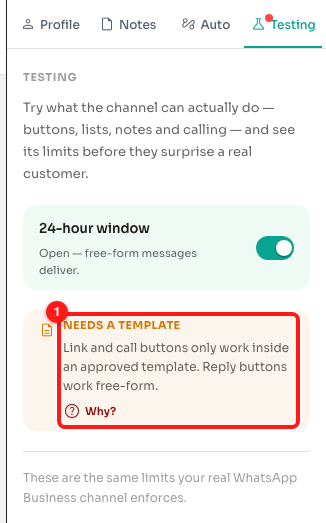
Step 7 — a link button flagged as template-only (1).
Either put the link or the number in the message text, or move the whole message into a template and submit it for approval.
Step 8 — A list holds ten rows in total
Remove the buttons, then choose + → List. Give the list a button label, add a section, and start adding rows. The heading counts them for you, and Add row switches off at ten — the cap is on the whole list, not per section, which is the one people are usually caught by.
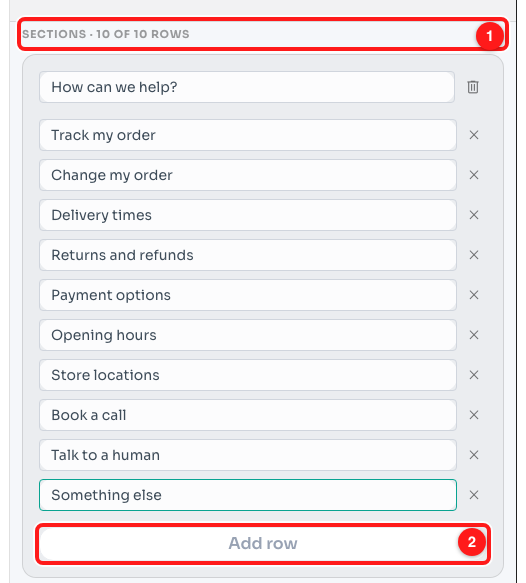
Step 8 — the row counter reads 10 of 10 (1) and Add row is disabled (2).
Row and section labels are kept short on purpose, and the editors cut you off as you type, so you cannot write one WhatsApp would refuse. If you need more than ten choices, split them across two list messages.
The sixth rule: no attachment on a list
A list message is text only. WhatsApp has no place in a list for a photo, a PDF or a video, so a message carrying both a list and a file is refused. Remove the attachment, or send the file as its own message just before or after the list.
Reply buttons are different — a message with buttons can carry an attachment.
How ChatDaddy tells you
- In the testing channel — the Testing tab shows a red dot, lists what your draft breaks, and marks each one Blocked (a real channel refuses it) or Needs a template (the same content is fine inside an approved template). Send is greyed out while something is blocked.
- In the Inbox — the Add Button panel warns you about a title that is too long before you can add it, and a message that Meta refuses comes back with a red failure card under it in the conversation.
- In a message flow — the Add Button control is disabled once you have three, List is disabled while buttons are attached, and each one explains itself on hover.
Frequently asked questions
What does “Needs a template” mean?
It means the content is fine, but not as an ordinary free-form message. Move it into a WhatsApp message template, submit the template for approval, and send it that way. Blocked is different — a blocked message is one WhatsApp will not accept in any form, so the message itself has to change.
My emojis disappear from button titles.
WhatsApp only accepts plain text on a button, so emojis and a few special characters are stripped out before the message is sent. Worth knowing when you are close to the 20-character limit: the length is counted after the stripping, on what actually reaches the phone.
Can I send more than three options?
Yes — use a list instead of buttons. A list holds up to ten rows across all its sections, and the customer picks one from a menu. Beyond ten, split the choices over two messages.
I have a personal WhatsApp channel. Do these rules apply to me?
Not in the same way. On a personal (QR-linked) channel your buttons and lists go out as a poll instead, which is why the message step warns you when a flow can run on both channel types. Lists are not supported on Messenger or Instagram at all.
Does the testing channel send anything or cost credits?
No. It is a simulation: no channel is created, no message or note is sent, no call is placed and no credits are used. It enforces the same limits as a real WhatsApp Business API channel, which is what makes it useful for practising.
The Send button is grey and I cannot click it.
Something in the draft is blocked. Open the Testing tab on the right — every rule the draft breaks is listed there with the reason, and Send comes back as soon as the blocked one is fixed.