
WhatsApp Business API: Profile Settings, File Limits & Account Best Practices
Configure your WABA business profile (photo, about, address, website), know Meta's file size limits and number rules, reserve your WhatsApp username, and follow best practices that keep your account in good standing.
Also searched as: edit WhatsApp business profile, WABA profile settings, WhatsApp API file size limit, business profile photo WhatsApp, WhatsApp username reserve, phone number limit WABA, business vertical WhatsApp, WhatsApp profile description, supported file types WhatsApp API, avoid WABA ban best practices
After connecting your WhatsApp Business API (WABA) channel to ChatDaddy, take a few minutes to complete your business profile, understand Meta's limits, and lock in the habits that keep your account healthy.
Editing your WhatsApp Business Profile
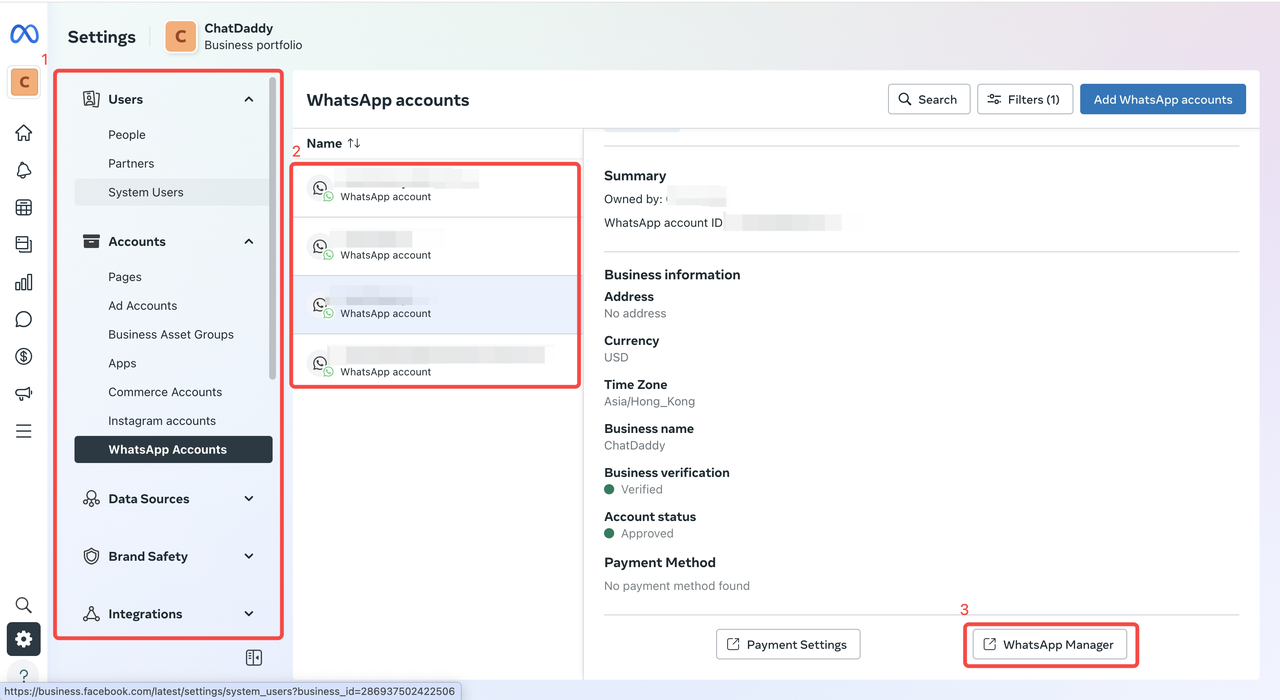
Your public business profile (photo, about, address, website) is managed in Meta's WhatsApp Manager:
- Go to business.facebook.com → Settings → WhatsApp Accounts → select your WABA → WhatsApp Manager.
 2. Open Phone numbers, click your number, and edit the Profile section.
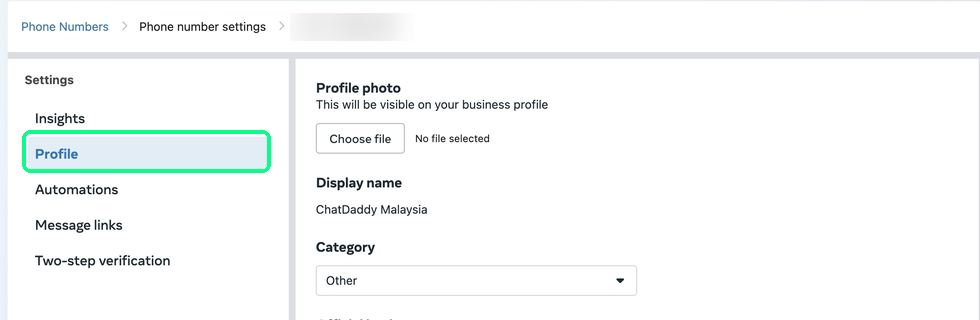
Profile field rules (Meta limits):
| Field | Rules |
|---|---|
| Profile Photo | Recommended 640×640 px. Images under 192×192 may fail on upload. |
| About | Shown under your profile photo. Max 139 characters. |
| Address | Max 256 characters. |
| Description | Max 512 characters. |
| Valid email format, max 128 characters. | |
| Vertical | Your industry (Retail, F&B, Education, Finance, etc.). ⚠️ Cannot be reset to empty once set. |
| Websites | Up to 2 URLs (must include http:// or https://), max 256 characters each. |
Supported file types & size limits
| Type | Maximum size |
|---|---|
| Audio & Video | 16 MB |
| Document | 100 MB |
| Image | 5 MB |
| Sticker | 100 KB |
Messages types the API does not support: reactions on API messages, deleted messages, polls, and disappearing (ephemeral) messages.
Phone number rules
- The number cannot be active in the WhatsApp Personal or Business app — delete the app account first, then register it on the API. (The number still works normally for calls and SMS.)
- VoIP, toll-free and landline numbers are not allowed (e.g. Google Voice).
- Unverified businesses can register up to 2 phone numbers; verified businesses up to 20 per Business Manager. Stuck at a lower cap? Submit a Meta Direct Support request (Ask a Question → WABiz: Account & WABA → Increase Phone Number Limits).
Reserve your WhatsApp business username (new)
Meta is rolling out business usernames (e.g. @YourBusinessName) — a unique handle customers can use to find and message you without your phone number. Unlike your display name, a username must be unique per phone number.
Reserve yours early so nobody else claims it:
- Meta Business Suite → Settings → WhatsApp Accounts.
- Click the phone number → Phone numbers → pencil icon.
- Go to Username → Create, enter or pick a suggested name → Save.
Meta holds the reserved username for your number and activates it when the feature reaches your region.
Also coming — usernames change contact identity: when a customer adopts a username, their phone number may no longer be shared with your business; Meta introduces a Business-Scoped User ID (BSUID) instead. Make sure the contact book for WhatsApp toggle stays ON in Meta Business Suite → Business settings → Business info — turning it off can cause duplicate contacts when there's been no interaction for 30+ days.
Best practices to keep your WABA healthy
One verified Business Manager. Use a single Meta Business Manager per business, verify it with official documents, and keep your business name, address and website consistent across MBM, WABA and Ad accounts. Multiple MBMs with identical details get flagged.
Real admins, tight access. Grant admin rights only to authentic Facebook profiles with real history, keep the list short, audit it regularly, and turn on 2FA for every admin.
Don't burn numbers. Avoid repeatedly deleting and recreating phone numbers — resolve issues through Meta instead. Use clear display names ("Acme Co – KL" beats "Acme").
If your WABA gets disabled: don't create a new WABA (that reads as policy evasion). Appeal via Meta Business Support with your business licence and proof of domain ownership, and fix any Business Messaging Policy violations first. Before appealing, note down your MBM ID, WABA ID and quality rating from Business Manager — Meta asks for them. See How to Appeal If Your WhatsApp Business Account (WABA) Is Banned.
FAQ
Can customers see my business name instead of my number?
Only Official Business Accounts (green tick) show the business name to contacts who haven't saved you. See WhatsApp Green Tick Application Requirements.
Does the API support group chats?
The WhatsApp Cloud API now supports small, invite-only groups via the Groups API — see WhatsApp Groups API. Traditional consumer-style group management is not supported.
Where do I see conversation usage and spend?
WhatsApp Manager → Account tools → Insights shows real-time messaging and spending analytics.
Why is my contact's profile picture missing in ChatDaddy?
Meta's API doesn't expose contact profile pictures — no platform can display them.
Why can't my contact see which message I replied to?
Messages older than 30 days move to Meta long-term storage, so the quoted "reply-to" bubble can't be shown. This is a Meta limitation in both directions.
"Account in maintenance mode" (error 131057)?
Your WABA is briefly in maintenance during a throughput upgrade — it resolves itself in about a minute.