
Getting Ready for WhatsApp Promotional Messaging (Opt-Ins, Templates & Quality)
Everything to prepare before sending WhatsApp promotional broadcasts on ChatDaddy — opted-in contacts, approved templates, credit balance, messaging limits, and how to scale from 250 to unlimited messages a day.
Also searched as: WhatsApp promotional messages, marketing broadcast WhatsApp, opt in WhatsApp marketing, broadcast prerequisites, increase messaging limit fast, WhatsApp broadcast failed, rate limit hit WhatsApp, spam rate limit, template broadcast requirements, promotional message rules
Promotional messaging on WhatsApp uses approved message templates sent to opted-in contacts at scale. Get these four things right before your first campaign and you'll avoid failed broadcasts, quality drops and account restrictions.
Before you begin — the 4 prerequisites
- Sufficient credits — template messages consume WABA credits. Check and top up your balance at https://app.chatdaddy.tech under Plan & Billing. See the Plan & Billing walkthrough.
- An approved message template — create and submit templates for Meta approval before the campaign. If one gets rejected, see How to Resubmit Your Template on ChatDaddy.
- A healthy quality rating — your number must not be Flagged or Restricted. Check it in seconds: Keep an Eye on Your WhatsApp Account Quality.
- Opted-in contacts — every recipient must have agreed to receive marketing messages from you.
⚠️ Opt-in is not optional. Sending marketing messages to people who never agreed to hear from you is the fastest way to get blocked, reported, and rate-limited. Collect opt-ins through your website, checkout flow, QR codes, or an opt-in question in your Message Flow — and always honour opt-outs immediately.
Note: If your business is unverified, broadcasts are limited to 250 unique contacts per day. Complete Business Verification on Meta to unlock higher tiers.
How messaging limits scale
Your daily messaging limit increases when both conditions hold:
- Message quality: your phone numbers and templates keep a Medium or High quality rating.
- Usage threshold: in the last 7 days you've initiated at least 50% of your current limit (e.g. 1,000 conversations on a 2K limit).
Kept consistently, limits scale 250 → 2K → 10K → 100K → Unlimited — in as little as 4 days.
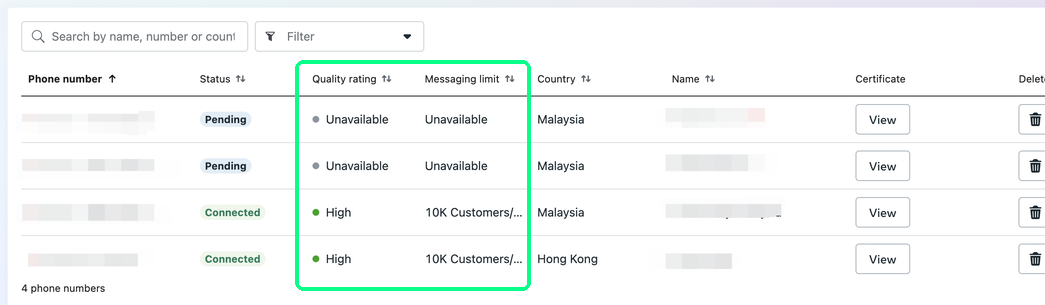 ChatDaddy's AI Tier Assistant tracks your progress live and tells you exactly how many more unique customers to reach.
The Alternate Path Program (scale without full verification)
Meta can also upgrade your limit purely on performance:
- 1K → 10K: send at least 500 messages to unique contacts in a day — the upgrade lands within 24 hours of the 500th message.
- 10K → 100K: send at least 5,000 messages to unique contacts the next day.
- 100K → Unlimited: send at least 50,000 messages to unique contacts the day after.
Meet each day's threshold with a Medium/High quality rating and you can go from 1K to Unlimited in about 4 days.
Quality rating — the thing that gates everything
Your rating reflects customer feedback over the past 7 days:
- 🟢 High — customers respond positively.
- 🟡 Medium — some concerns; address them promptly.
- 🔴 Low — significant complaints; fix quality before scaling.
If your rating drops, your limit doesn't decrease — but scaling pauses until it recovers. If you hit your daily limit, new business-initiated conversations are blocked until the 24-hour cap resets (you can still reply inside open service windows).
To recover a low rating: review templates added in the last 7 days, send only to opted-in contacts, keep content compliant with WhatsApp's Business Policy, and trim broad cold audiences.
Troubleshooting common broadcast errors
"Rate limit hit"
You sent too many messages too fast — Meta caps throughput at roughly 80 messages per second per number. Split large sends into smaller batches, or space out campaigns.
"The broadcast audience is greater than the message limit"
Your audience exceeds your current daily messaging limit. Reduce the audience, or raise your limit via verification and the scaling rules above.
"Spam rate limit hit"
Too many recipients marked your messages as spam. Pause, review your templates and targeting, send only to engaged opted-in contacts, and reduce frequency until quality recovers.
Related guides
- How to Grow Your WhatsApp Messaging Limit with the AI Tier Assistant
- Keep an Eye on Your WhatsApp Account Quality
- Start a campaign at https://app.chatdaddy.tech or submit a support ticket if you're stuck.