
App Node, App Store, HTTP Request or Zapier: Which Integration Should You Use?
ChatDaddy connects to other software four ways — App node, App Store, HTTP Request and Zapier. Here is what each one does, when to use it, and why searching App Trigger for your app returns "No items Exist".
Also searched as: integration, app node, app store, http request, zapier, which integration, connect app, webhook, third party, automation integration, no items exist, app trigger, message flow integration, shopify, google sheets
ChatDaddy can talk to other software in four different ways. They look similar inside the app, but each one does a different job — and picking the wrong one is the most common reason people get stuck. This article explains all four in plain language, then points you to a step-by-step guide for each.
The four methods at a glance
| Method | Where you find it | Which direction | Best for |
|---|---|---|---|
| App node | Flow builder → Add New Node → App | Runs inside a flow | ChatDaddy's own building blocks (tickets, AI chatbot) and HTTP Request |
| App Store | App Store page in the left menu | Outside app starts your flow | Shopify, Google Form, Stripe and 17 other supported apps |
| HTTP Request | App node, or Action node → Http Request | Flow sends data out | Your own system or any API, if you have a developer |
| Zapier | Tools → Zapier, or Action node → Zapier | Both directions | Anything not on the App Store list — around 8,000 apps |
"I searched for my app under App Trigger and got No items Exist"
This is the single most common question, and it is not a bug. The App Trigger tab in the flow builder only ever contains one item: Webhook. It is not a directory of third-party apps, so searching it for Google Sheets, Shopify or anything else will always return nothing.
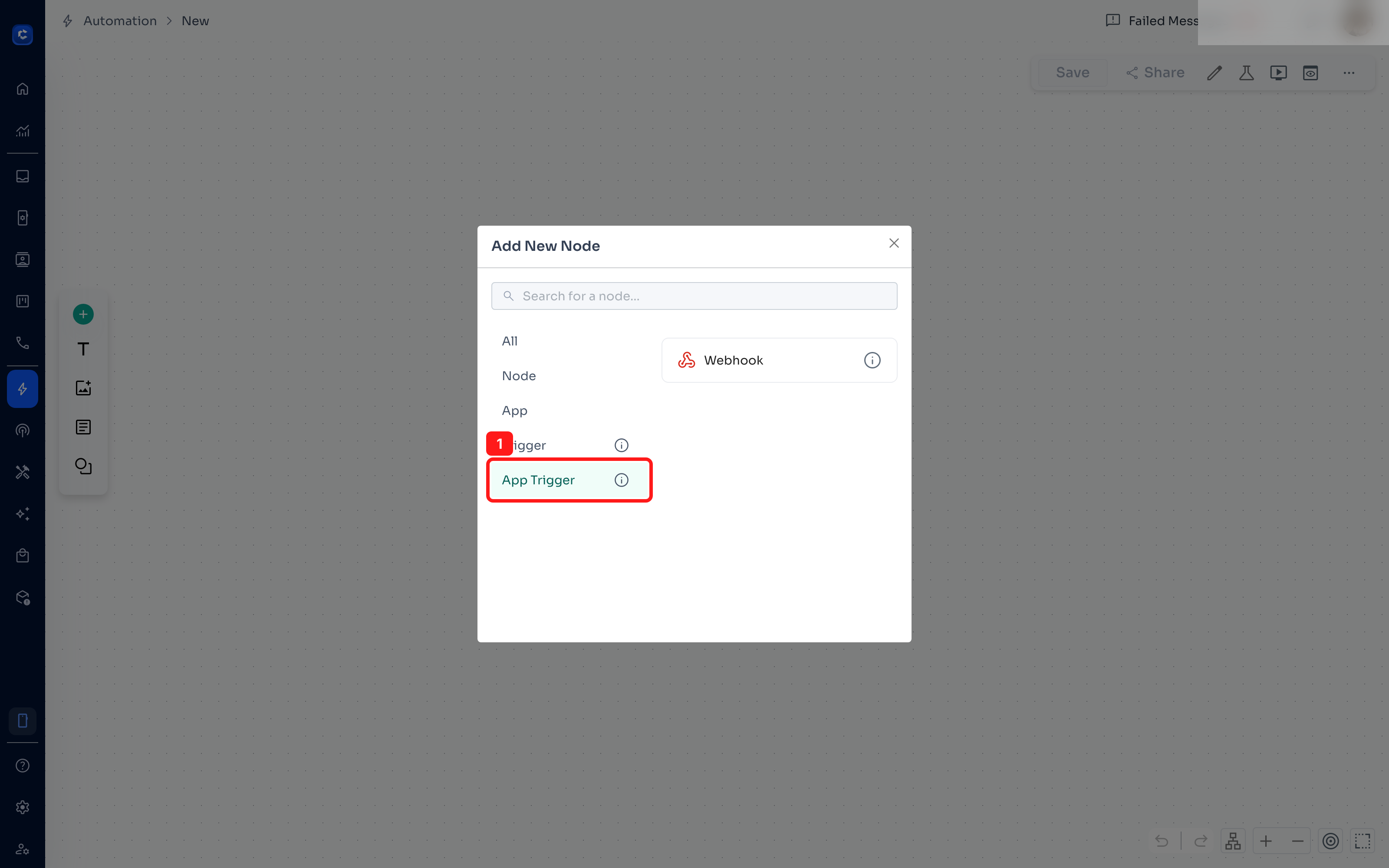 If you are looking for a specific app, use this order instead:
- Check the App Store — 20 apps are supported natively (Shopify, WooCommerce, Google Form, Google Calendar, Stripe and more).
- If it is not there, use Tools → Zapier — Zapier connects around 8,000 apps, including Google Sheets.
- If you have a developer and your own API, use HTTP Request instead — it is free and direct.
Google Sheets is a good example. It is not in the App Store list, so it is not available as an App Trigger. Use Tools → Zapier, where there is a ready-made 'Send ChatDaddy message flows for new Google Sheets rows' workflow.
1. The App node — ChatDaddy's own building blocks
The App node adds a step inside a flow. Despite the name, these are not third-party apps: they are ChatDaddy's built-in tools (AI Chatbot, Create Ticket, Update Ticket, Modify Contact, Notify Team Member) plus HTTP Request. Full guide: How to Use the App Node in a Message Flow
2. The App Store — let an outside app start your flow
The App Store is where you connect an external service such as Shopify or Google Form. When something happens in that service, ChatDaddy starts the message flow you picked. This is the only method where the outside app is in charge — everything else runs from inside a flow. Full guide: How to Use the App Store: Connect an App and Trigger a Message Flow
3. HTTP Request — a direct call to any URL
If Zapier is a middleman, HTTP Request is a direct phone call. Your flow calls a URL you type in — no third party, no extra subscription. It only sends data out, and it usually needs a developer to set up. Full guide: How to Use the HTTP Request Action (Step-by-Step with Screenshots)
4. Zapier — reach almost any app
Zapier sits between ChatDaddy and around 8,000 other apps and can work in both directions. It needs a Zapier account, which is free for small volumes and paid beyond that. Full guide: How to Use Zapier with ChatDaddy (Tools and the Action Node)
How to choose
- Is the app in the App Store list? Use it. Done.
- Does something outside ChatDaddy need to start the flow (a new sheet row, a new lead)? Use Zapier via Tools → Zapier.
- Does the flow just need to push data out, and you have a developer? Use HTTP Request — it is free and direct.
- None of the above? Use Zapier from the Action node.
Frequently asked questions
Why are there two Zapier screens? Tools → Zapier is Zapier's own full editor embedded in ChatDaddy — use it for anything, in either direction. The Action node → Zapier button creates a small Zap that is tied to that one step of that one flow. They use different connections, so signing in on one does not sign you in on the other.
Can the App Store trigger a specific step in the middle of my flow? No. An App Store trigger always starts the flow from its first step. If you need different behaviour, use conditions inside the flow.
My message flow does not appear in the App Store dropdown A flow can only be selected once it has a starting step and at least one action saved. Open the flow, add a first step, save it, then come back.
What is the Webhook App Trigger for? It lets any outside system start a flow by sending a request to a URL that ChatDaddy generates for you. It is the do-it-yourself version of an App Store trigger and needs someone comfortable with APIs.